How to check a Blinkit, Zepto or Instamart PO before you punch it
Check four things on every quick-commerce PO line before you confirm it: item code, stock, price and shelf life. Then turn the result into a punch-ready order sheet and an ASN draft. Step by step, plus a free Claude skill that does it.
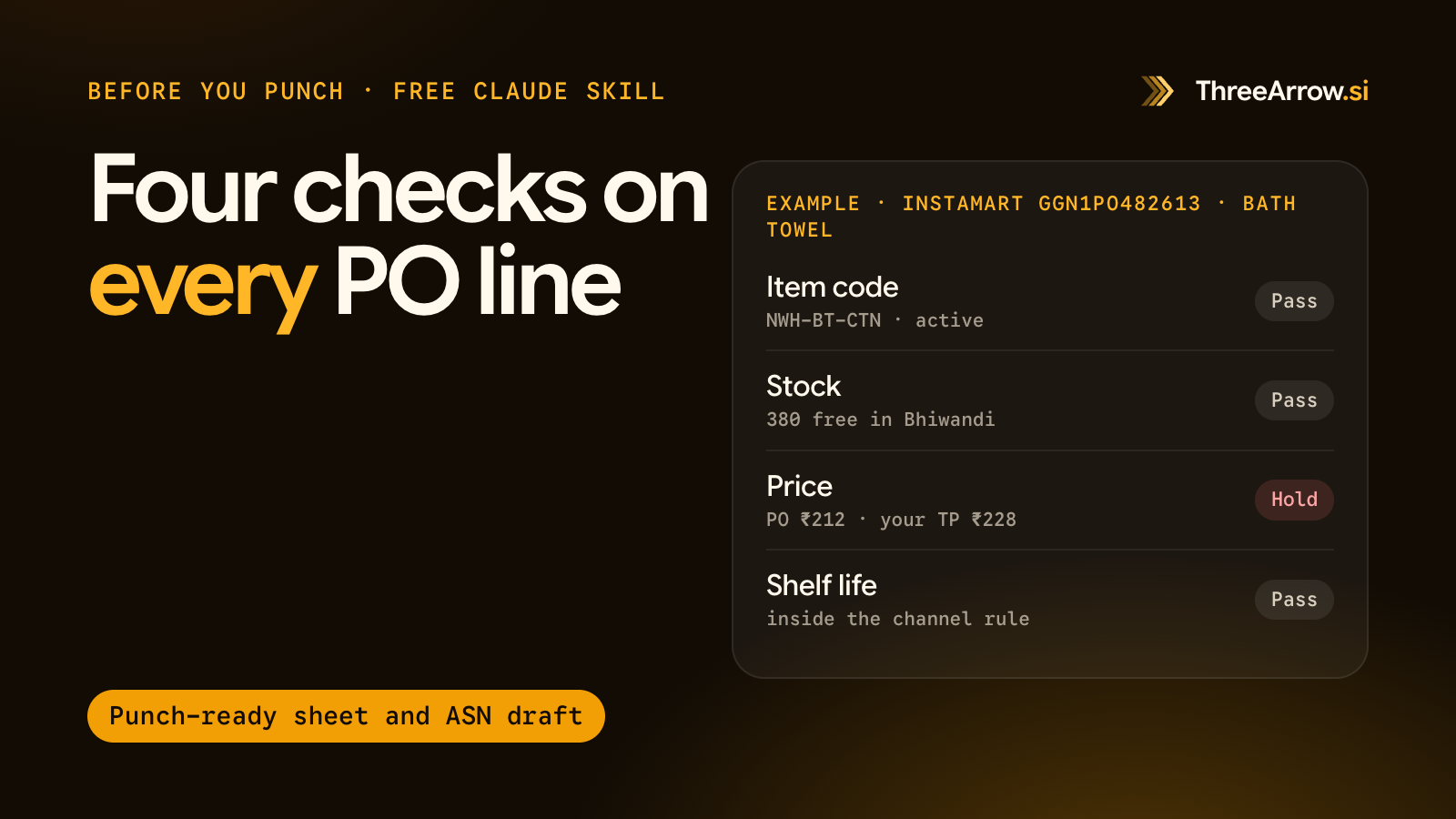
Before you punch a Blinkit, Zepto or Swiggy Instamart PO, check four things on every line: the item code maps to your SKU, you hold the stock, the price matches what you agreed, and the batch you’ll ship still has enough shelf life when it reaches the channel’s warehouse. Lines that pass go into a punch-ready order sheet. Lines that don’t get a flag and a person’s decision. Then you draft the ASN from the batches you’re actually shipping.
It takes a few minutes per PO by hand, which is fine for one PO and painful for twenty. Either way, the order of the checks matters.
What you’ll need
- The PO as the portal’s CSV or XLSX export, or the PDF.
- A stock sheet by warehouse, ideally by batch with manufacture and expiry dates. Sellable units only, not stock already reserved for other orders.
- An item mapping from the channel’s item codes to your SKUs and EANs.
- Your price list per channel: agreed cost price, MRP and GST rate.
- The shelf-life rule each channel applies at inward, from your agreement or category manager.
- Case pack sizes, if the channel orders in cases.
How do you check a quick-commerce PO by hand?
- Read the header. PO number, ship-to facility and the expiry or delivery-by date. If the PO expires before you can deliver, raise it now, not at the warehouse gate.
- Check the arithmetic. Quantity times unit cost should equal each line total. A line that doesn’t add up is a typo somewhere, and it will travel to your invoice.
- Map every item code. Look up each channel item code in your mapping. If it isn’t there, check the EAN. An item you can’t map is a hold: don’t guess which SKU they meant.
- Check the price. Compare the PO’s unit cost, MRP and tax rate with your price list. A cost that differs means a conversation with the category manager. An MRP that differs usually means the channel holds an old MRP, which affects both the invoice and the labels.
- Check the stock across all open POs. Add up what every PO in today’s batch asks for, per SKU, before you confirm any of them. Otherwise two POs both claim the same units and one ships short.
- Check shelf life per batch. Remaining life at delivery is the expiry date minus the delivery date. If the rule is a share of total life, total life is the expiry date minus the manufacture date. Ship the oldest batch that passes, never one that fails.
- Round to the case. If the channel orders in cases of 24 and you can ship 90, you confirm 72.
- Fill the order sheet. One row per line: PO quantity, confirmed quantity, shortfall, batch plan, status and a one-line note.
- Draft the ASN from the batch plan: SKU, EAN, batch, manufacture and expiry dates, quantity and cases per line, ready to map into the portal’s ASN form.
Why check shelf life separately from stock?
Because “we have it” and “we can ship it” are different answers. A warehouse can hold 50 units of a SKU that are all too close to expiry for the channel’s rule. If your sheet calls that line “short”, the team goes looking for stock that exists. Call it shelf-life short instead, and the next move is obvious: send fresher stock from another warehouse, or move the old batch to a channel that accepts it.
A short line costs you a fill rate. A rejected batch at inward costs you the trip as well.
Do it with the free skill
We built a free Claude skill for this: the quick-commerce PO checker. Give Claude the PO, your stock sheet and, if you have them, the mapping, price list and shelf-life rule. It runs the checks above across every PO in the file, allocates stock first-expiry-first-out among batches that pass, and returns:
- a summary of units ordered against units you can confirm,
- a punch-ready order sheet with a status and a plain note on each line,
- an ASN draft by batch, and
- a list of lines that need a person, with the raw text.
It never raises a quantity above the PO or changes a price to make a line pass. The free skills page shows how to add it to Claude.
Common mistakes
- Checking one PO at a time. Stock gets promised twice. Allocate across the whole day’s POs together.
- Matching on product name. Names differ by channel. Match on item code, then EAN, and treat a name match as a guess.
- Losing leading zeros. Spreadsheets turn EANs and item codes into numbers. Keep them as text.
- Ignoring MRP mismatches. The invoice and the label must agree with what the channel expects.
- Confirming before checking expiry. The rejection comes later, at the warehouse, when it’s more expensive.
Where ThreeArrow comes in
The skill checks the POs you give it. ThreeArrow’s PO to SO agent fetches them for you from the portals and your inbox, runs these checks and punches the approved lines into your OMS or ERP. Invoice and dispatch then files the ASN and books the slot. More on that in how to automate Blinkit, Zepto and Instamart PO punching.
Questions
What shelf life do Blinkit, Zepto and Instamart need at inward?
It depends on the channel, the category and your agreement, and it can change. Take the rule from your vendor agreement or your category manager, then check every batch against it before you confirm a line.
Should we ship a short line or drop it?
Usually ship what you can and flag the shortfall, unless your agreement penalises partial lines. Decide once as a team and write it down so everyone confirms POs the same way.
Can the free skill punch the PO into our OMS?
No. It checks the PO and gives you a punch-ready sheet and an ASN draft. A person reviews them and punches or uploads them in your own system.