How to pause ads before a SKU runs out of stock
Work out days of cover for every advertised SKU, set the lines where ads pause, slow down or push, and move budget from SKUs that are running out to SKUs that have stock and sell. A spreadsheet method, plus a free Claude skill that does it.
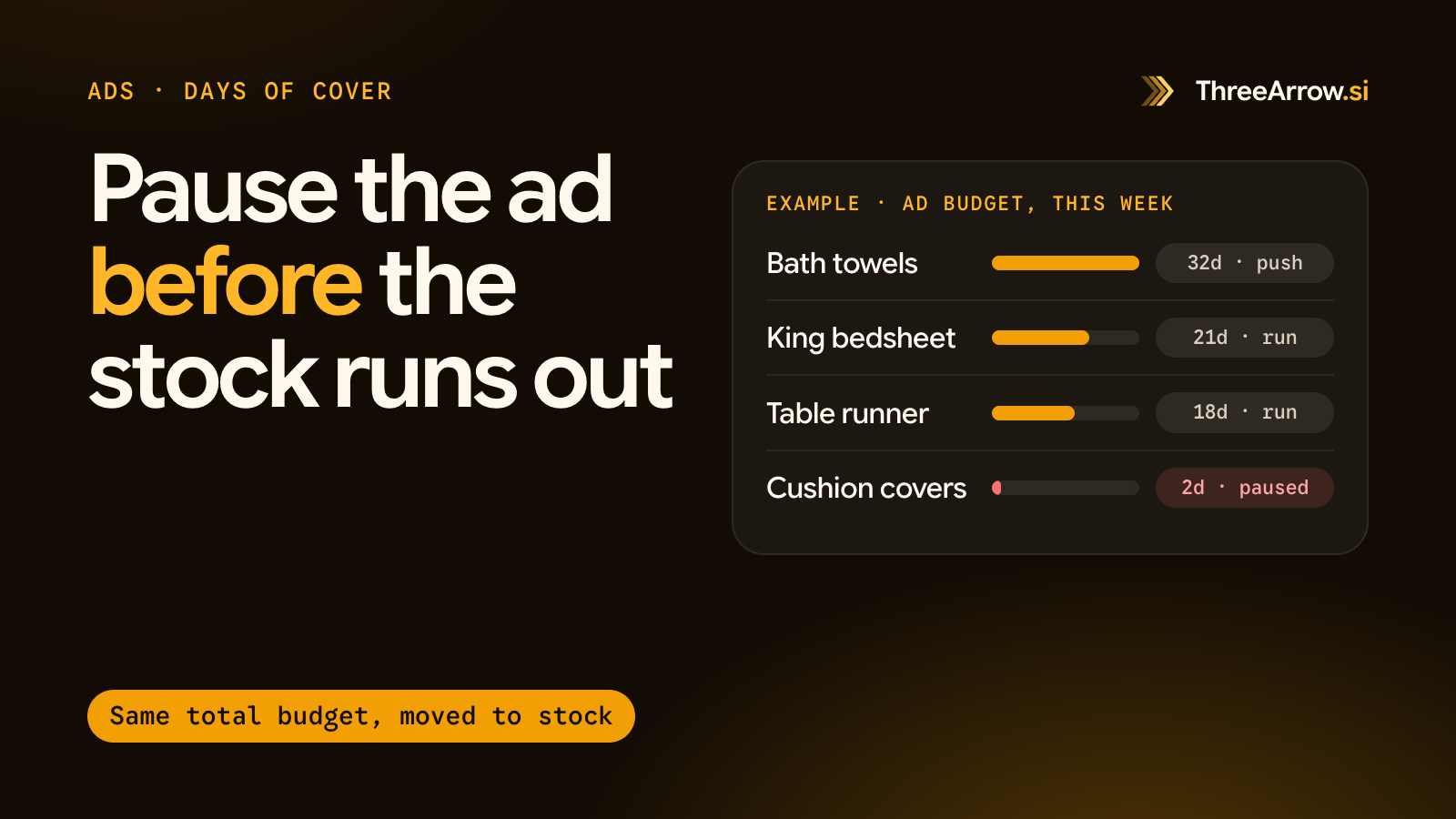
To stop paying for ads on stock you don’t have, work out days of cover for every SKU you advertise: sellable units divided by the units you sell a day. Then set three lines. Below the first, the ads pause. Below the second, they slow down. Above the third, if the ads earn their keep, they get more budget. Run it every day, per city where the channel lets you target cities, and move the money from SKUs that are running out to SKUs that have stock and sell.
Ads and stock usually sit with different people in different tools, so nobody sees a campaign spending on a SKU that’s nearly gone. A shared sheet fixes most of that.
What you’ll need
- An ads report for the last seven days, by campaign and SKU: spend, clicks, attributed sales, and city if the channel reports it.
- Today’s stock by SKU and location: sellable units, plus anything inbound and when it arrives.
- Units sold per day per SKU and location, from the last two to four weeks of orders.
- A mapping from each ad’s product ID (ASIN, FSN or item ID) to your SKU, and for brand or collection ads, the SKUs they lead to.
- Your targets: the ROAS or ACoS each channel needs to hit.
How do you do it in a spreadsheet?
- Put everything on one row per campaign, SKU and city. Spend, sales and clicks from the ads report; sellable units, inbound and daily sales from the stock side.
- Work out days of cover. Sellable units divided by units sold per day. A SKU with 36 units selling 18 a day has 2 days of cover.
- Add inbound only if it lands in time. If a delivery arrives before current stock runs out, add it to get effective cover. If it lands after, it doesn’t save this week’s sales.
- Work out ROAS. Attributed sales divided by spend. If a row has very few clicks, mark the ROAS as too thin to judge.
- Set your three lines. For example: pause below 3 days, slow down below 7, push above 21. Treat these as a starting point and change them to fit how fast you restock.
- Give every row one action:
- Pause when cover is below the first line, or stock is zero.
- Cap when cover is below the second line: cut budget or bids a step, so the stock you have lasts and sells at full price.
- Push when cover is above the third line and ROAS beats your target: raise budget a step, paid for by the money you freed elsewhere.
- Hold everything else.
- Write the reason next to each action, with the cover and ROAS it rests on, so anyone can check it in seconds.
- Make the changes in each ad console, then check the next day that they stuck.
What about campaigns with many SKUs?
Pause the smallest thing that stops the waste. If one SKU in an ad group is low, remove that SKU and keep the rest running. Brand and store ads lead shoppers to a page of products, so judge them on the cover of the products on that page, weighted by where the spend goes. For catalogue or shopping ads on Meta and Google, exclude low-cover SKUs from the product set instead of pausing the campaign.
On quick commerce, stock lives store by store. A SKU can be fine in Mumbai and nearly gone in Bengaluru, so act city by city where the channel allows it. We wrote more on that in stock-aware ads on quick commerce.
Spending to push a SKU with two days of cover only brings the stock-out forward.
Do it with the free skill
We built a free Claude skill that runs this for you: the stock-aware ads guard. Give Claude your ads report and stock sheet, and your sales rate and targets if you have them. It maps ads to SKUs, works out cover and effective cover per city, and returns:
- the spend in the period on SKUs that now have no stock, the number to drive to zero,
- an action table: pause, cap, push, hold or review, with a suggested change and a one-line reason,
- a list of ad spend it couldn’t tie to a SKU.
It never suggests raising your total spend; push rows are paid for by pauses and caps on the same channel. It doesn’t touch your campaigns. The free skills page shows how to add it to Claude.
Common mistakes
- Using a sales rate from stock-out days. Days with no stock show zero sales and drag the rate down. Count only days the SKU was in stock.
- Counting inbound that lands too late. It makes cover look safe when it isn’t.
- Pausing a whole campaign for one SKU. You lose sales on everything else in it.
- Pushing on thin data. A great ROAS from a handful of clicks is luck, not a signal.
- Changing price and bids on the same day. You won’t know which one moved sales.
- Trusting stale stock. If the stock sheet is a day old, say so before anyone acts on it.
Where ThreeArrow comes in
The skill tells you what to change today. ThreeArrow’s Ads agent does it as the numbers move: it reads spend, sales and stock through the day where each channel allows, moves budget to products with cover and margin, raises bids where a rival is out of stock, and keeps any budget move above your limit waiting for a yes.
Questions
How many days of cover should trigger a pause?
There is no single right number. It depends on how fast you can restock and how each channel treats a stock-out. Start with a few days, watch what happens for two weeks, and adjust. The free skill uses editable defaults and says when it used them.
Should we pause the whole campaign or just one SKU?
Pause the smallest thing that stops the waste. If one SKU in an ad group is running out, remove or pause that SKU and let the rest keep selling.
Does the free skill change our campaigns?
No. It gives you a list of actions with the reason and the numbers behind each one. Your team makes the changes in each ad console.