How to write marketplace listings for Amazon, Flipkart, Myntra, Nykaa, quick commerce and noon
Write every listing from one fact sheet, build keywords from the words shoppers type, then fit the same facts into each marketplace’s own title, bullets, description and search fields, in English and Arabic for the GCC.
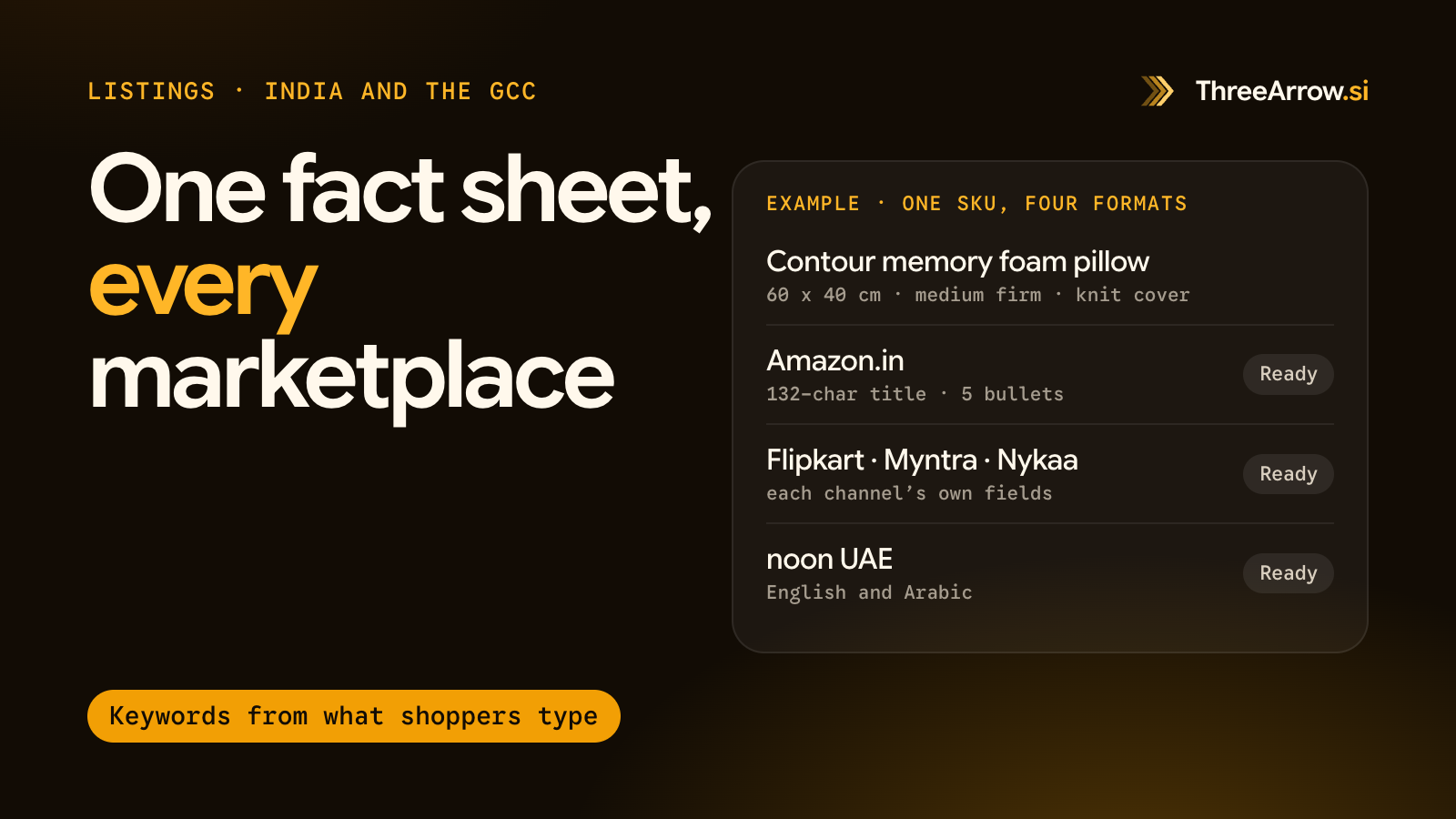
You write a good marketplace listing in three moves. Start from one fact sheet per product, so every claim is true and the same everywhere. Build a keyword set from the words shoppers actually type. Then fit those facts and keywords into each channel’s own fields: title, bullets, description and search keywords. The facts never change between Amazon, Flipkart, Myntra, Nykaa, Blinkit, Zepto, Instamart and noon. The shape does.
Most weak listings fail on the first move, not the writing. A title says “500 g”, the attributes say “450 g”, and a bullet promises something nobody can prove. Fix the facts and the writing gets easy.
What you’ll need
- A product sheet with brand, product type, variant, size or net quantity, ingredients or material, how to use, and the claims the brand can prove.
- Each channel’s current template or style guide. Download it from the seller portal for your category. It tells you the fields, the required attributes and the length limits. Limits change and differ by category, so take them from here, not from a blog post or memory.
- Your keyword list, if you have one: search terms report, the channel’s search suggestions, and what your team hears from customers.
- For the GCC, someone who reads Arabic natively to review the Arabic copy.
How do you write a listing by hand?
- Build the fact sheet. One row per product, one fact per cell. Everything you write later must trace back to this row. If a fact isn’t here, it doesn’t go in the listing.
- Build the keyword set. Start with the generic name a shopper would type, not your brand’s product name. Add synonyms and the words people really use: “atta” and “wheat flour”, “phool makhana” and “fox nuts”. For the GCC add Arabic search terms. Remove competitor brands; they don’t belong anywhere in your listing.
- Rank the keywords. The two or three with the clearest buying intent go in the title. The next tier goes in bullets. The rest go in backend search fields where the channel has one.
- Write the title. Brand, then product type, then the attribute that decides the purchase: variant, size, count. It should read like a phrase a person would say, not a pile of keywords.
- Write the bullets or key features. One idea each. Lead with the benefit, follow with the fact that proves it. What it is, what it’s made of, how to use it, who it’s for, what’s in the box.
- Write the description. Two or three short paragraphs that add what the bullets didn’t: use, care, storage.
- Fill the backend keywords. Synonyms, other spellings, other languages, and no repeats of words already in the title.
- Check everything against the template. Count lengths, confirm required attributes, and read the title, bullets and attributes side by side for contradictions.
How does each marketplace differ?
- Amazon.in and Amazon.ae: a title, usually five bullets, a description and a backend search terms field. Amazon counts search terms in bytes, so Hindi and Arabic words use up the space faster than English.
- Flipkart: listings are built from a category form full of attributes. Getting brand, model, type, colour, size and pack count right matters as much as the copy.
- Myntra: fashion and lifestyle listings rely on attributes like article type, colour, fabric and fit. Write clear product details, size and fit, and material and care.
- Nykaa: shoppers read ingredients and how to use. Say who the product is for and what each key ingredient does, and stay away from anything that reads like a medical claim.
- Blinkit, Zepto and Swiggy Instamart: the name does almost all the work on a small screen: brand, product, variant and net quantity. Keep the generic word in it. Check that mandatory details like net quantity, MRP and country of origin are in the catalog sheet’s attribute columns.
- noon: English and Arabic, with the same facts in the same order in both.
How do you write Arabic listings for noon and Amazon.ae?
Write the Arabic from the fact sheet, not from your English sentences. A word-for-word translation reads stiff and often drops a fact or adds one. Use clear Modern Standard Arabic, Arabic punctuation, and the brand name the way the brand writes it. Keep sizes and counts identical to the English. Then have a native speaker read it before upload. Claims like halal or organic go in only if the product holds the certificate.
Do it with the free skill
We built a free Claude skill that runs these steps for you: the marketplace listing writer. Give Claude your product sheet and the channel templates, and it builds the fact sheet, the keyword set and a listing per channel in the right shape, in English and Arabic where you ask for it. It counts every field, reports bytes for Amazon search terms, flags missing facts instead of inventing them, and marks any length it couldn’t confirm from your template.
Download it, add it to Claude, and ask for listings. The free skills page shows how to install it in a couple of minutes.
Common mistakes
- Taking limits from memory. They change. Use the template you downloaded this month.
- Keyword-stuffed titles. A title that repeats the product type three times reads like spam to shoppers.
- Facts that disagree. The title says one size, an attribute says another. Shoppers notice, and so do returns.
- Unprovable claims. “Best”, “No. 1” and “clinically proven” without proof are a risk on every channel.
- Competitor brands in backend keywords. Leave them out.
- Machine-literal Arabic. It costs trust with exactly the shoppers you wrote it for.
Where ThreeArrow comes in
The skill writes listings when you ask. ThreeArrow’s Catalog agent takes the whole job: it fills each marketplace’s template in English and Arabic, checks the images, uploads the listings you approve, tracks them until they’re live and fixes rejections.
Questions
What are the exact character limits for titles and bullets?
They differ by marketplace and category, and they change. Download the current category template or style guide from each seller portal and take the limits from there. The free skill does the same and marks any limit it can’t confirm.
Can I use the same listing on every marketplace?
Use the same facts, not the same copy. Each channel has its own fields and shoppers scan them differently, so the shape changes even when every fact stays the same.
Do I need Arabic listings for noon and Amazon.ae?
If you want Arabic-reading shoppers to find and trust the product, yes. Write it from the same fact sheet, keep every fact identical to the English, and have a native speaker review it before upload.